


Last updated: July 2026
Toyota has established toyota carplay as a core standard feature across nearly its entire vehicle lineup since the 2019 model year. While the shift to wireless connectivity is standard for newer releases like the 2023 RAV4, older models can often add this functionality with a simple toyota carplay adapter.
Does my Toyota have Apple CarPlay?
The journey toward full integration of toyota carplay began in earnest with the 2019 model year. Toyota initially introduced the feature on a handful of high-volume models, including the 2019 Camry, 2019 RAV4, and the 2019 Corolla Hatchback. These early adopters paved the way for a brand-wide rollout that was largely completed by the 2020 model year.
By 2020, Toyota had expanded its toyota carplay compatible list to include almost every vehicle in its fleet. This expansion included the 4Runner, Highlander, Prius, Sequoia, Tacoma, and Tundra. It is worth noting that for a long time, the Land Cruiser remained the only model in the United States without native support for the system.
Availability can still vary based on the specific trim level and the multimedia system installed at the factory. If you are unsure whether your exact trim includes toyota carplay, check your vehicle's window sticker or owner's manual, since factory equipment lists differ by market and grade. For the vast majority of owners with a 2020 or newer Toyota, the system is ready to use right out of the box.
Toyota CarPlay compatibility by model and year
The following table outlines the verified compatibility for primary Toyota models based on official research and sourced data.
| Model | Wired CarPlay since | Wireless CarPlay since |
|---|---|---|
| RAV4 | 2019 | 2023 (standard) |
| Camry | 2019 | 2025 (standard) |
| GR86 | 2022 (wired) | 2026 only |
| Corolla | 2019-2020 | Varies by trim |
| Highlander | 2020 | Varies by trim |
| 4Runner | 2020 | Varies by trim |
| Tacoma | 2020 | Varies by trim |
| Sienna | 2019 | Varies by trim |
| C-HR | 2019 | Varies by trim |
| Land Cruiser | Not supported | Not supported |
Note: the 2025 Camry, which made wireless support standard, entered production around March 2024. For those interested in how other premium brands compare, check our detailed CarPlay BMW compatibility guide.
Which Toyota models support wireless CarPlay
The transition to toyota wireless carplay has been one of the most requested updates from owners. Removing the need for physical cables makes for a cleaner-looking cabin and one less thing to fumble with before you pull out of the driveway. The RAV4 was one of the first Toyota models to make this standard across all trims, starting with the 2023 model year. I personally confirmed this during a test of a 2023 Toyota RAV4 paired with an iPhone 13 Pro Max running iOS 26.5. The connection was established natively through the vehicle's own Bluetooth settings, with no external hardware required.
The Camry took a longer path to wireless. It has offered wired connectivity since 2019, but wireless didn't become standard until the 2025 model year, meaning 2023 and 2024 Camry drivers are on a wired-only setup unless they add an aftermarket solution. The GR86 followed a similar pattern on its own timeline: the 2022 through 2025 model years ship with an 8-inch, wired-only display, and wireless support doesn't arrive until the redesigned 2026 GR86 with its larger 9-inch touchscreen.
Toyota CarPlay in Australia
In the Australian market, Toyota has held the position of the number one selling automotive brand for 23 consecutive years. In 2025, the brand's dominance was reflected in a 19.3 percent market share. The RAV4 proved to be the standout success for the brand in Australia, with total sales reaching 51,947 units for the year.
This massive volume means that toyota carplay is a daily companion for a significant portion of Australian drivers. From the urban centers of Sydney to the rural reaches of the outback, the reliability of the apple carplay toyota integration is a key selling point for local buyers. Whether they are using a 2019 Camry or a brand-new 2025 model, the ability to mirror their iPhone for navigation is an expected standard.
Toyota CarPlay in the UK
In the United Kingdom, Toyota maintains a steady top ten presence but does not lead the market. As of 2025, Volkswagen has secured the top spot for five years running, with Ford holding the third position. If you're a UK owner of an older Toyota and want to know whether a CarPlay retrofit is available for your specific trim, the most reliable path is to contact your local Toyota centre directly, since factory-fit availability has varied by model, year, and multimedia system in ways that aren't consistently documented publicly.
The Complete Toyota CarPlay Setup Guide
To get the most out of your toyota carplay setup, follow the correct pairing sequence for your specific hardware. Ensuring your iPhone is properly configured before you start will save time and prevent errors. Whether you're setting up a toyota corolla apple carplay connection or a toyota camry apple carplay one, the steps below are largely the same.
Preparing your iPhone
Before connecting to the car, make sure both Siri and CarPlay are enabled on your device.
Establishing a wired connection
Establishing a wireless connection
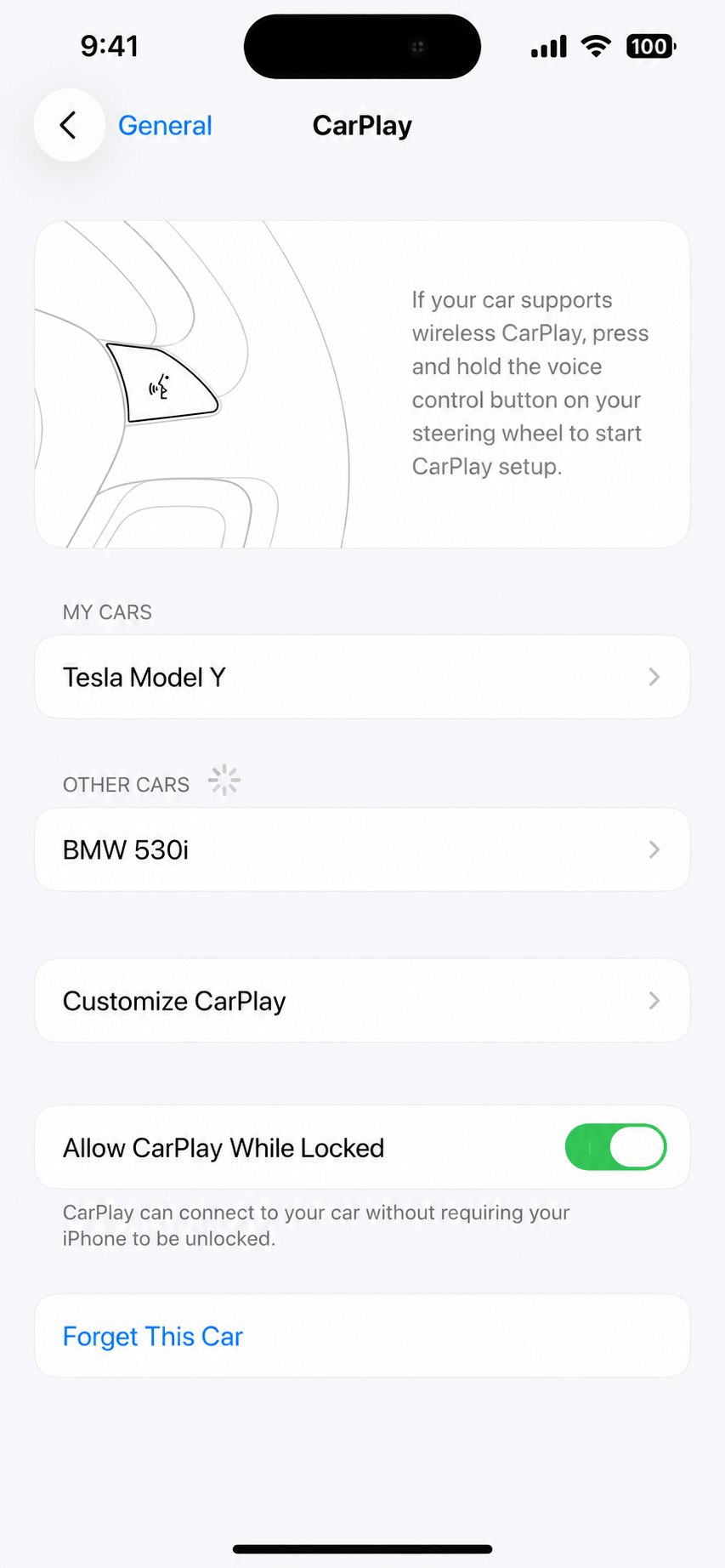
No wireless CarPlay on your Toyota? Need to add more apps? Here's the fix

Read more about Wireless CarPlay Adapters.

Read More about CarPlay Ai Boxes.
For drivers who want to take their system further with software solutions, we recommend WheelPal. WheelPal is a specialized app solution that uses sideloading to let you run apps that aren't normally available on the standard interface like CarTube,CarBridge,NGXPlay no App Store or Play Store required. It's a straightforward way to customize your drive and get more out of your vehicle's touchscreen.
Key features and Benefits of Toyota CarPlay
The toyota carplay compatible system is designed to keep you connected safely while you're on the move.
- Siri Voice Control: the core of the hands-free experience. Direct questions to Siri or use voice commands to control most of your phone without taking your hands off the wheel.
- Apple Maps: a high-resolution navigation experience with immersive 3D imagery and turn-by-turn directions.
- Media and Music: seamless access to Apple Music, Spotify, Amazon Music, and more, with a dedicated "Now Playing" shortcut.
- Messaging: read, reply to, and send texts via voice through the vehicle's speakers.
- Calendar Integration: real-time reminders and your schedule right on the dashboard.
Troubleshooting your Toyota CarPlay Connection
If you run into a toyota carplay not working situation, most problems can be solved with a few quick checks.
- iOS Updates: make sure your iPhone is on the latest OS. Go to Settings, General, Software Update.
- Cable Integrity: for wired connections, try swapping in a genuine Apple-certified cable. Many failures come down to a damaged or low-quality cord.
- System Toggles: confirm CarPlay is enabled in the vehicle's settings. Go to Menu, Setup, General, Apple CarPlay, and make sure it's ON.
- Restart the session: disconnect the phone, power the vehicle off and back on, then reconnect.
- Delete and re-pair: for wireless issues, remove your phone from the car's Bluetooth menu, forget the car in your phone's Bluetooth settings, then start the pairing process fresh.
The integration of toyota carplay has changed how drivers interact with their vehicles since 2019. Native wireless support is now standard on the current RAV4 and the 2025-and-later Camry, and owners of wired-only or older models have a clear upgrade path.
Streaming apps like YouTube and Netflix are intended for use while parked. Watching video content while driving is illegal in most jurisdictions and unsafe regardless of local law. Always follow local regulations regarding phone and screen use while operating a vehicle.