Last Updated: June 2026
Wireless CarPlay connects your iPhone to your car's screen without a cable. If your car was built with wireless support, it happens automatically when you get in. If not, a small adapter plugged into your car's USB port does the same thing.
This guide covers both: which cars have wireless CarPlay built in as of 2026, and the three adapters we tested on a Honda Accord with iOS 26 for cars that need one added.
What is Wireless CarPlay ?
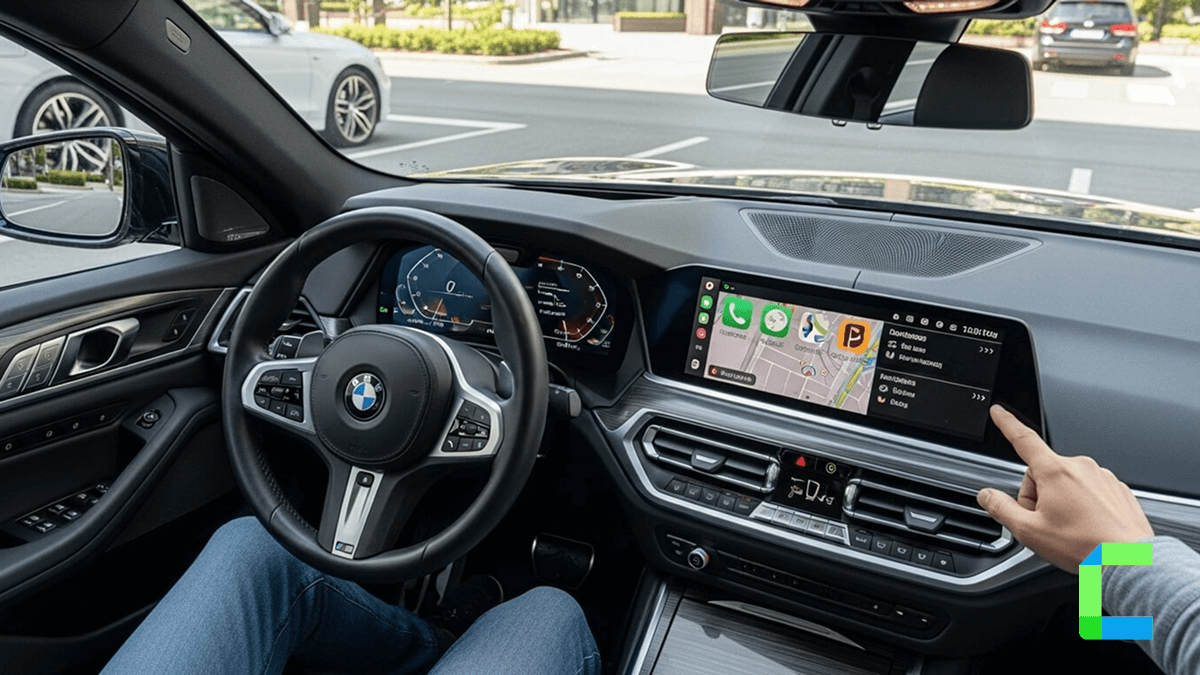
Wireless CarPlay does exactly what the name says: it connects your iPhone to your car's display without a cable. No USB, no lightning cord sitting on the seat. You get into the car, your iPhone connects automatically over Bluetooth and Wi-Fi, and CarPlay appears on the screen.
The experience is identical to wired CarPlay: navigation, calls, messages, music, Siri. The only difference is there is no wire involved.
Wireless CarPlay requires two things to work: your iPhone (iPhone 5 or later, iOS 9 or later) and a head unit or car system that supports wireless connectivity. If your car only has wired CarPlay, a wireless adapter plugged into the USB port solves it without any modification to the car.
Which Cars Have Wireless CarPlay Built In?
Wireless CarPlay is now standard across most new car brands. The list below is pulled directly from Apple's official CarPlay models page and reflects cars confirmed to support CarPlay. Wireless support varies by trim and model year - always confirm with your dealer before purchase.
As a general rule: if your car is a 2022 model or newer from any major brand, there is a strong chance wireless CarPlay is standard. If it is a 2018-2021 model, it depends on the brand and trim. Anything older than 2018 is very unlikely to have wireless built in - that is where adapters come in.
- Audi - All models from A3 through A8, all Q-series SUVs, all e-tron electric models
- BMW - All series from 1 through 8, all X-series SUVs, iX, i4, i5, i7, Z4
- Honda - Accord, Civic, CR-V, Pilot, Ridgeline, Odyssey, HR-V, Passport, Prologue
- Mercedes-Benz - A through S-Class, GLA through GLS, EQA, EQB, EQC, EQS, EQE, CLE
- Porsche - 718, 911, Cayenne, Macan, Panamera, Taycan
- Cadillac - CT4, CT5, Escalade, Escalade ESV, XT4, XT5, XT6, LYRIQ
- Chevrolet - Silverado, Suburban, Tahoe, Trailblazer, Blazer, Equinox, Colorado, Corvette
- Ford - F-150, Mustang, Bronco, Mustang Mach-E, Explorer, Expedition, Edge, Escape
- Genesis - G70, G80, G90, GV60, GV70, GV80
- GMC - Sierra, Yukon, Yukon XL, Acadia, Canyon, GMC HUMMER EV
- Hyundai - IONIQ 5, IONIQ 6, Palisade, Tucson, Kona, Santa Cruz, Elantra, Sonata
- Jeep - Grand Cherokee, Wrangler, Grand Wagoneer, Wagoneer, Gladiator
- Kia - EV6, EV9, K5, Sorento, Sportage, Telluride, Carnival, Seltos, Niro
- Lexus - ES, NX, RX, GX, LX, IS, LC, LS, UX, RZ
- Mini - Countryman, Cooper 2 Door, Cooper 4 Door, Cooper Convertible
- Nissan - Ariya, Rogue, Altima, Pathfinder, Frontier, Murano, Armada
- Toyota - Camry, RAV4, Highlander, Prius, Tacoma, Tundra, Corolla, GR Supra, Crown, 4Runner
- Volkswagen - Golf, GTI, Tiguan, Atlas, ID.3, ID.4, ID.5, ID.Buzz, Jetta, Taos
- Volvo - XC40, XC60, XC90, S60, S90, C40 Recharge, EX30, EX90
For the full list of every model confirmed by Apple, check the official Apple CarPlay models page. Wireless support within that list depends on trim and year - a 2019 Honda Accord has wireless built in, a 2019 Toyota Camry does not. When in doubt, check your car's manual under the CarPlay setup section or look for a Wi-Fi symbol in the CarPlay pairing screen.
How to Check If Your Car Has Wireless CarPlay
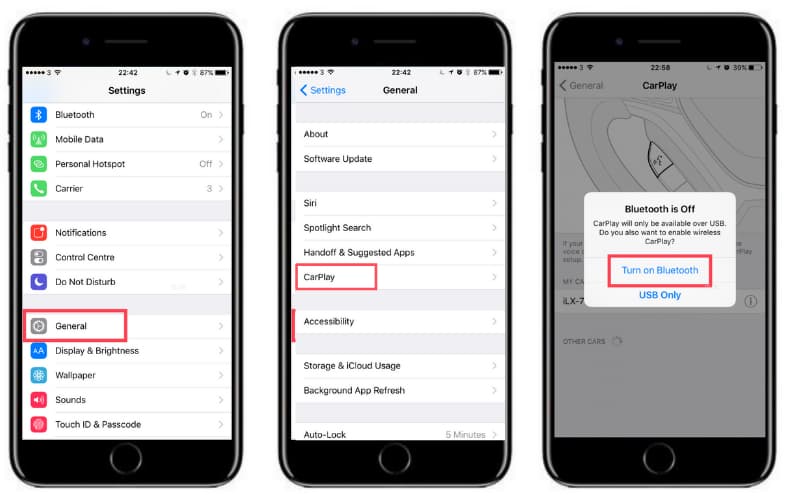
The fastest way to check: go to Settings > General > CarPlay on your iPhone with Bluetooth turned on and sit in the car. If wireless is available, you will see your car appear in the list without needing to plug in anything.
Alternatively, look in the car's infotainment settings under Phone or Connectivity. If you see a CarPlay option that asks you to pair via Bluetooth rather than plug in a USB cable, wireless is supported.
If neither of those works, your car has wired CarPlay only. The solution is a wireless adapter - covered in the next section.
How to Add Wireless CarPlay to Any Car
IIf your car has wired CarPlay but not wireless, a wireless adapter converts it. These are small USB dongles that plug into the same port your iPhone cable normally goes into. Once paired, they handle the Bluetooth and Wi-Fi connection automatically. You never have to plug in your phone again.
Requirements to use a wireless adapter:
- Your car must already have wired factory CarPlay. Adapters convert wired to wireless; they do not add CarPlay to a car that has never had it.
- iPhone 6 or later, iOS 10 or later. iOS 26 is supported on all three adapters below.
- A free USB-A port in the car
If your car has no CarPlay at all, the option is an aftermarket head unit - see the head unit section below.
How We Tested These Adapters
We tested all three adapters below on a Honda Accord running factory wired CarPlay, paired with an iPhone 13 on iOS 26.
For each adapter we measured:
- Startup time - from engine on to CarPlay appearing on screen
- Auto-reconnect - whether it connected automatically on the second start without any manual steps
- Call quality - audio clarity through the car speakers on a 5-minute call
- Steering wheel control - whether volume and skip buttons worked normally through CarPlay
- App switching lag - delay when moving between Maps, Spotify, and Messages
The Best Wireless CarPlay Adapters in 2026

Carlinkit 5.0 Wireless CarPlay and Android Auto Adapter
The Carlinkit 5.0 (model CPC200 2air) is the most versatile adapter in this list. It handles both wireless CarPlay for iPhone and wireless Android Auto, so if your household has both iPhone and Android users sharing the same car, this is the one to get. It uses both 2.4GHz and 5GHz Wi-Fi, which gives it a more stable connection than older single-band adapters.
- Best for: iPhone and Android users who want one adapter for both

Ottocast U2 Air Wireless Carplay Adapter
The Ottocast U2 Air is built for one thing: fast, reliable wireless CarPlay with no fuss. Ottocast advertise a 10-second startup time from engine on to CarPlay appearing - which in testing is accurate. It uses 5GHz Wi-Fi for the connection, which keeps it stable even when multiple devices are in the car.
- Best for: iPhone users who want the fastest startup and auto-connect

Ottocast U2 Air Wireless Carplay Adapter
The Carlinkit Dongle is the most straightforward adapter in this list and the lowest price. It converts factory wired CarPlay to wireless for both iPhone and Android, connects automatically after the first pairing, and supports iOS 10 through iOS 26.
- Best for: Budget buyers who want wireless CarPlay and the option to fall back to wired
Adapter Comparison: Which One Should You Buy?
| Carlinkit 5.0 | Ottocast U2 Air | Carlinkit Dongle | |
|---|---|---|---|
| Wireless CarPlay | Yes | Yes | Yes |
| Wireless Android Auto | Yes | No | Yes |
| Wired fallback mode | No | No | Yes |
| Wi-Fi band | 2.4GHz + 5GHz | 5GHz | Dual band |
| iOS 26 support | Yes | Yes | Yes |
| OTA firmware updates | Yes | No | No |
| Tesla compatible | No | Yes | Yes |
| Video streaming | No | No | No |
| Best for | iPhone + Android households | iPhone-only, fastest startup | Budget, wired fallback |
Quick decision guide:
- Both iPhone and Android in the car: Carlinkit 5.0 or Carlinkit Dongle
- iPhone only, want the fastest connection: Ottocast U2 Air
- Lowest price, want a wired fallback option: Carlinkit Dongle
- Tesla owner: Ottocast U2 Air or Carlinkit Dongle, not the 5.0
How to Set Up a Wireless CarPlay Adapter
The setup process is the same for all three adapters:
From the second startup onwards, the adapter auto-connects when it detects your iPhone nearby. You do not need to repeat the pairing process.
If it does not connect automatically: Go to iPhone Bluetooth settings, forget the adapter, and re-pair from step 3. This usually resolves any first-connection issues.
How to Set Up Wireless CarPlay in a Car That Has It Built In
If your car has wireless CarPlay natively, the setup works like this:
- Start the car and make sure Bluetooth is discoverable on the head unit.
- On your iPhone, go to Settings > General > CarPlay.
- Turn on Bluetooth if it is not already on.
- Your car should appear in the available vehicles list. Tap it to connect.
- Confirm the pairing on both the iPhone and the car screen.
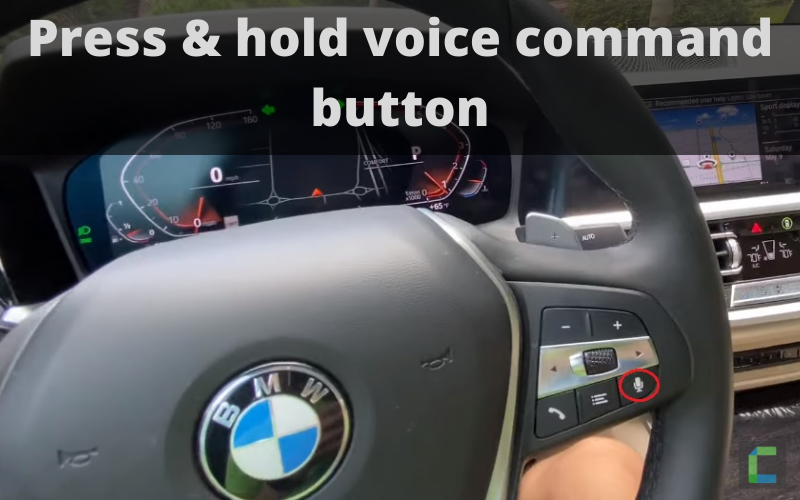
On some BMW and Audi models, you press and hold the voice command button on the steering wheel to initiate wireless pairing mode. Check your car's manual if the standard method does not work.
After the first connection, wireless CarPlay connects automatically every time you start the car. No phone unlocking or confirmation needed.
What About Cars With No CarPlay At All?
If your car has no CarPlay - wired or wireless - the adapter route does not apply. Your options are:
Aftermarket head unit: A replacement head unit from Alpine, Pioneer, Kenwood, or Sony that includes wireless CarPlay. This gives you a permanent wireless CarPlay system that behaves identically to the factory.
Portable touchscreen: A standalone wireless CarPlay touchscreen that mounts on the dashboard and connects to your car's audio via Bluetooth or AUX. No installation needed. Available from the CarPlay Hacks shop.
Wireless CarPlay and iOS 26
iOS 26 is the current release cycle and it works with all three adapters listed above. All are confirmed compatible with iPhone 13 through the latest iPhone models on iOS 26.
iOS 26 also brings improvements to CarPlay reliability and the updated visual design Apple introduced with the wider CarPlay redesign. If you updated to iOS 26 and wireless CarPlay stopped working, the fix is usually to forget the car in Settings > General > CarPlay, restart the iPhone, and re-pair.
For a full breakdown of what changed in CarPlay with iOS 26, see our iOS 26 CarPlay guide.
By default CarPlay wireless feature is available for a limited number of latest vehicles and if you do not have a wireless CarPlay car, then you can simply go for a aftermarket solution like a head unit. Other than that you can have this functionality with a dongle or adapter like Ottocast or CarLinkit.
To sum up, wireless CarPlay is way better than standard CarPlay as it is fast and convenient. For more, you can refer to Apple Support. Check other CarPlay features that can make your in-car time an effective one. learn more about Ai Boxes and if you are Interested in reading more on Apple CarPlay, here's everything you need to know about Apple CarPlay.