Last Updated: June 2026
ZLink CarPlay is middleware developed by Beijing Zjinnova Software Co., Ltd. that enables wireless Apple CarPlay and Android Auto on compatible aftermarket Android head units. It emulates CarPlay protocols over Wi-Fi and Bluetooth and comes pre-installed on systems from manufacturers like Dasaita and Atoto.
How does ZLink CarPlay work?
Technically, the zlink carplay app acts as a bridge between your iPhone and the Android operating system of the head unit. It is not a simple screen mirroring tool. Instead, it emulates the specific communication protocols that Apple CarPlay requires. This makes the iPhone believe it is connected to a certified Apple device. The software simultaneously manages the high-speed video stream, audio channels, and touchscreen inputs.
Unlike factory-installed CarPlay which is built-in by the car manufacturer, dasaita zlink and similar versions are third-party implementations. One significant difference is that ZLink is functional for standard navigation and music, but it does not support video streaming services. Apps like YouTube and Netflix are blocked by design to limit driver distraction and ensure safe driving practices.
Is ZLink right for your car?
Before setting up ZLink, confirm your car setup matches what ZLink actually needs.
| Your situation | Is ZLink right for you? | What you actually need |
|---|---|---|
| Car has no screen at all | No. ZLink needs an existing Android head unit | A plug-and-play CarPlay touchscreen |
| Car has a factory screen but no CarPlay | No. ZLink does not work on factory head units | A portable CarPlay touchscreen |
| Car already has built-in wired CarPlay | No. ZLink is for Android head units only | A wireless CarPlay adapter |
| Car has an Android head unit with ZLink pre-installed | Yes. Continue to the setup guide below | You are in the right place |
For users without a screen or with a factory screen that lacks CarPlay, a plug-and-play CarPlay touchscreen is a simpler path.


If your car already has built-in wired CarPlay, use a wireless adapter instead of seeking a carplay zlink download. If you have an Android head unit with ZLink pre-installed, continue to the setup guide below.
ZLink 5 vs ZLink 6. Which version do you have?
Most current head units use zlink 5, with build 5.4.47 being the latest stable version for many devices. A newer version, zlink 6, has limited availability and includes improved boot times and better handling of dual-phone connections. XDA forum discussions show that zlink 6 version 6.0.8 on the Hengchen channel offers confirmed support for zlink ios 26.
Understanding your zlink channel is critical before attempting any zlink firmware update. Each manufacturer licenses a specific channel, such as Dasaita or Atoto. If you install an APK from a different channel, the app will crash or show a mismatch error. Always check the device info section in your settings to confirm your channel name before looking for an update.
Summery table
| ZLink 5 | ZLink 6 | |
|---|---|---|
| Availability | Pre-installed on most head units | Limited -- not available on all channels |
| Latest stable build | 5.4.47 | 6.0.8 (Hengchen channel) |
| Boot speed | Standard | Faster |
| Dual-phone support | Basic | Improved |
| iOS 26 support | Unreliable | Confirmed on Hengchen channel |
| Update risk | Low | High -- wrong channel APK will crash the app |
How to set up ZLink CarPlay on Dasaita G12
Follow these steps to configure your Dasaita G12 system for use with your smartphone.
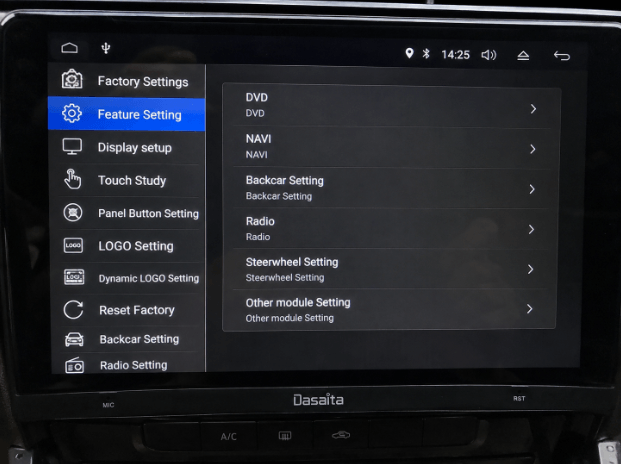
Enable CarPlay on Dasaita G12
On Dasaita units, you must first enable the feature in the hidden factory menu.
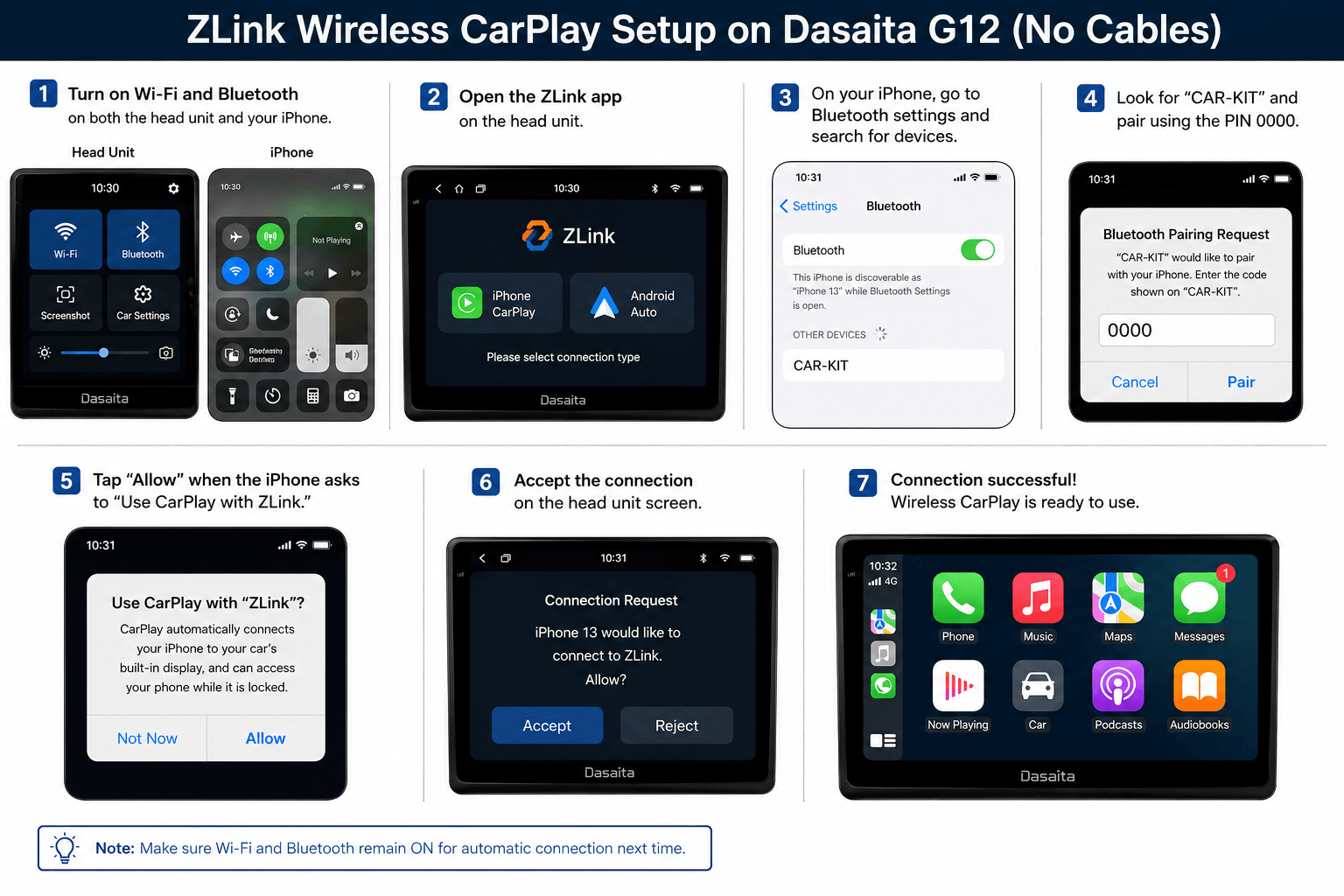
Wireless CarPlay setup
Once the feature is enabled, use these steps for a zlink setup without cables.
Wired CarPlay setup
If you prefer a wired connection for better stability, use zlink wired carplay.
Common ZLink errors and how to fix them
ZLink not connecting after firmware update
This often affects G12 units after update QCM6125_20240530. The zlink not connecting issue occurs even when Bluetooth is paired. Fix it by holding the RST button for 15 seconds for a forced reset or performing a factory reset via a FAT32 formatted USB drive.
Channel mismatch crash
The app may crash immediately after an update if the wrong APK was used. Check the device info to confirm your channel name. Only use a carplay zlink download that matches your specific manufacturer channel.
Stuck on connecting loop
ZLink may show a "Connecting" message indefinitely. This affects both version 5 and version 6. Try toggling Bluetooth off and on on your iPhone or restart the head unit using the RST button.
ZLink disappeared after factory reset
The app may vanish from the app drawer after a full reset. Because ZLink is not always in the base firmware, you must download the correct firmware package from the manufacturer forum and reinstall it via USB.
Onnet error on firmware update check
This error means the over-the-air update check failed. There is no OTA fix for this. You must perform a manual zlink firmware update using the USB method.
iOS 26 black screen or loop
After updating to zlink ios 26, some users see a black screen. Fix this by updating to version 6.0.8 if your channel supports it. G12 users should check the Dasaita forum for the latest confirmed firmware compatible with the newest iOS.
ZLink is a capable middleware solution for Android head units when the firmware is stable and the iOS version is compatible. For users whose ZLink has stopped working after an iOS update or firmware change, alternatives exist. ZLink not working on iOS 26? See the best alternatives to find hardware and software solutions that may better suit your needs. You can also browse the best CarPlay apps to enhance your driving experience.