Last Updated: August 2026
CarPlay Cast is a popular iOS tweak which is aka CarPlayEnable. CarPlay cast was developed by Ethan Arbuckle and now it is available on GitHub. If you are interested in using any app on Apple CarPlay, CarPlay Cast is for you. Recently it became a popular iOS tweak among car enthusiasts. CarPlay cast is an alternative to the popular tweak, CarBridge.
CarPlay cast was originally built for iOS 14 and hasn't seen a broad update since. Confirm compatibility with your specific iOS version before installing.
As we all know you cannot run all of your favorite apps on Apple CarPlay because Apple does not allow it. Especially if you cannot play video content on Apple CarPlay. Then here we go with the jailbreak tweaks to provide access to playing videos on Apple CarPlay. CarPlay cast can access the CarPlay UI and then it lets you run unsupported CarPlay apps on your screen. These unsupported apps are included with video streams too.
It does not require you to unlock your iPhone, it works well when your phone is locked too. Let your iPhone sleep and watch your favorite videos on the CarPlay screen.
You can add any app to your CarPlay now. We have listed the best software and hardware solutions for your convenience. Some need jailbreak and some don't need.
You can add these apps on your Apple CarPlay screen with CarPlay cast iOS 14.
- VLC Player
- Chrome
- YouTube
- IP Cam Viewer Pro
- Zattoo
- Plex
- Xbox
DRM Protected applications like Netflix and Hulu will also not be working with CarPlay cast. It has blacklisted these apps just for legal reasons. Also, several iOS system apps are unsupported in the CarPlay cast. Other than that YouTube and VLC Media player apps work normally with iOS 14 CarPlay cast.
How to add any app on Apple CarPlay with CarPlay Cast.
Best CarPlay cast alternatives.
CarBridge
CarBridge requires a jailbroken iPhone and is the most convenient alternative for CarPlay cast, supporting up to iOS 16.6.
CarBridge lets you customize your favorite apps like YouTube, Facebook, Twitter etc. Those who are still with iOS 16 are welcome to try CarBridge to add any app on Apple CarPlay.
NGXPlay
NGXPlay is also a jailbreak tweak which was also a popular tool among CarPlay lovers. Unlike the CarPlay cast and CarBridge, NGXPlay is a jailbreak tweak which can enable any app as you need. It is also only supports on iOS 14.8.1 and below versions. As it is not getting updates make sure to use it with a lower version running iOS device.
Airaw for CarPlay is another tweak you can use on iOS 14 CarPlay.
CarPlay++
CarPlay++ is another popular tweak among car enthusiasts who use jailbroken iOS 13 and iOS 14. CarPlay++ lets you customize your CarPlay screen with many apps and more attractive features.
WheelPal
WheelPal lets you add any app on Apple CarPlay, including YouTube and Netflix, with the help of other third party applications.
WheelPal installs through sideloading with AltStore using an IPA file, not the App Store and not jailbreak. Follow the in-app setup after installing to start adding apps to your CarPlay screen.
Hardware solutions to add any app on Apple CarPlay
1. Carlinkit AI Box
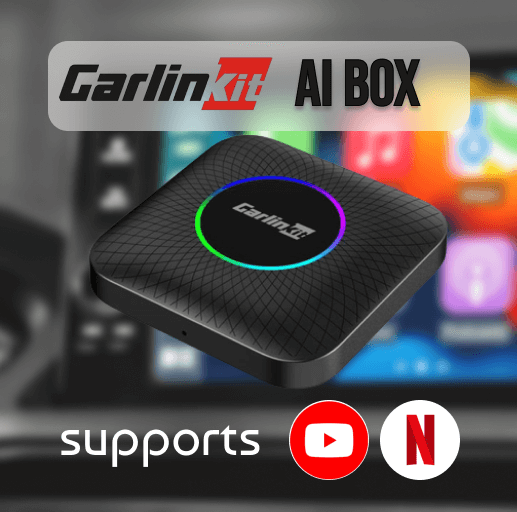
Discover the excellence of wireless CarPlay adapters with Carlinkit, the premier and globally acclaimed brand. Enter the realm of automotive enthusiasts with the Carlinkit wireless adapter. This wireless adapter seamlessly integrates with a multitude of apps, breaking barriers to include CarPlay DRM content like YouTube, Netflix, Hulu, and HBO. Unleash a new era of in-car entertainment with this exceptional adapter. Do not miss out – swiftly enable your cherished apps on your car screen.
Compatibility:
- Devices: iOS and Android Phones
- Cars: Models from 2016 to 2026
- Prerequisites: Compatible with models equipped with built-in CarPlay and Android Auto
Key Features:
1. Versatile Platform Support: Enjoy compatibility across multiple platforms.
2. Integrated 4+64 GB RAM and ROM.
3. Convenient USB Connectivity: The adapter is accompanied by a USB cable for seamless connectivity.
4. Streaming Prowess: Watch your favorite video content from streaming giants such as YouTube, Netflix, Hulu, and more.
5. Efficient and Reliable Setup: Quick and dependable installation for immediate use.
6. Automatic Reconnection: Effortlessly reconnect after the initial setup, ensuring a hassle-free experience for subsequent use.
Transform your driving experience with the Carlinkit wireless adapter for advanced technology and unparalleled convenience.
2. Carlinkit wireless CarPlay Ai TBox
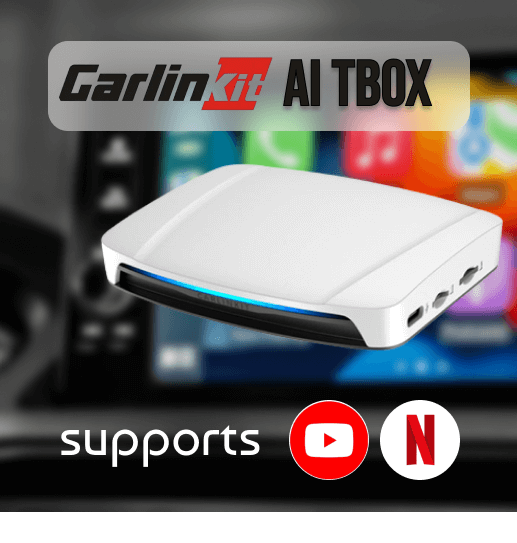
Introducing the Carlinkit Wireless CarPlay adapter, a convenient and innovative solution to add any app on Apple CarPlay. This adapter allows the use of CarPlay without the need for jailbreaking and opens the possibility of streaming Netflix, YouTube, and other video streams directly on Apple CarPlay. As video content gains popularity among car enthusiasts, this adapter has become a popular choice
Key Features:
- Compatible with iPhone 6s on wards.
- Supports iOS 10 till the latest.
- Designed for cars equipped with built-in Apple CarPlay.
- Upgrades wired CarPlay to Wireless CarPlay functionality.
- Enables streaming of Netflix, YouTube, and similar other video content.
- Establishes connections through both Wi-Fi and Bluetooth.
Here we got you more about CarPlay cast and its alternatives. Stay tuned for more updates on CarPlay apps and hacks. Not only CarPlay cast, visit carplayhacks to see how to add any app to Apple CarPlay and more jailbreak tweaks, apps, and solutions for CarPlay functions. You can also learn ways to Customize your CarPlay with our guide.
Remember, while enjoying your favorite apps on the road, prioritize safety. Your well-being is paramount. Have a secure and pleasant journey further!