Last updated: October 2026
NGXPlay is a jailbreak tweak that adds any app to Apple CarPlay, including YouTube, Netflix, and Facebook. NGXPlay itself supports iOS 8 through iOS 12 and requires a jailbroken device.The easiest way to get it is through WheelPal, which you sideload with AltStore or an IPA file. WheelPal itself needs no jailbreak, but NGXPlay does.
If you're on iOS 13 or later, NGXPlay's own updates don't cover your device yet. Use a related jailbreak tool like CarBridge (covered below) if your device is jailbroken up to iOS 16.7.6.
Most Common Methods to Install NGXPlay?
Downloading tweaks like NGXPlay is not as simple as downloading an app from the App Store as they are not available for direct downloads. But you can simply download them via Cydia or Sileo if your phone is Jailbroken.
So let's see what are the safest and the easiest ways to NGXPlay to be downloaded with hardware alternatives without jailbreak.
Cydia for Downloading NGXPlay
This method also requires jailbreak and all you need to do is jailbreak your iPhone with a compatible jailbreak tool and download the Cydia app.
Then add sources (Repo – BigBoss) through the Cydia app you have on your Home Screen.
BigBoss URL – http://apt.thebigboss.org/repofiles/cydia
Step Guide to Downloading NGXPlay (any iOS version)
 Eliza Faith
How to Use NGXPlay?
After installing NGXPlay, you can go to Settings and customize the NGXPlay app's settings. There you can do the following.
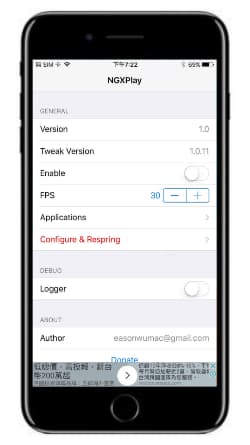
- Enable or Disable NGXPlay tweak
- Set Frames per second
- Select applications for Apple CarPlay.
So you can simply add any desired app on CarPlay with the + button.
You can visit NGXPlay website to learn more about this tweak.
Cian Roark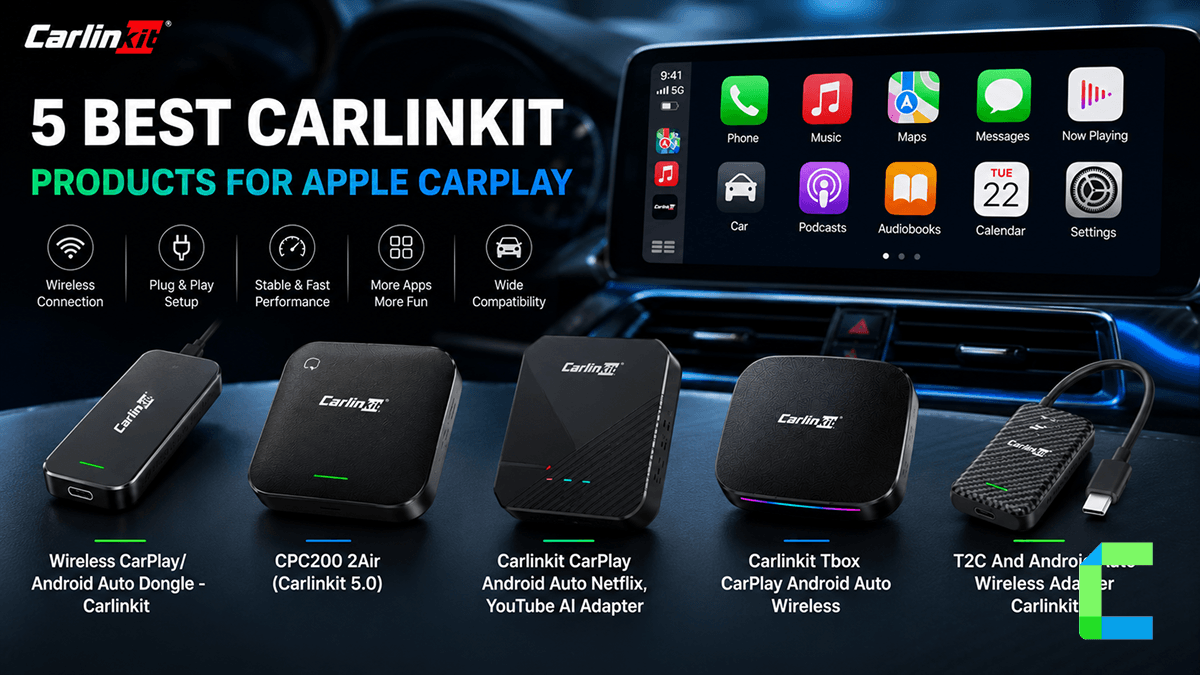
WheelPal
You can also use the WheelPal app to download NGXPlay into your phone. It is a third party app store which allows you to download not just NGXPlay but also other alternatives to NGXPlay like Carbrdige , Carplay++ , Cartube, Carmovie
Hardware Alternatives
Want apps on the car screen without jailbreaking? A CarPlay AI box runs apps on its own hardware.
Carlinkit AI Box Wireless

Carlinkit wireless AI box
Carlinkit is one of the famous brands of wireless AI adapters. Also, This handles all the preloaded applications like YouTube, Hulu, Netflix, etc.
- Built-in 8+128 RAM and ROM
- The adapter comes with USB cables
- Runs on Android 13 and supports app installation through the built-in Play Store.
- After connecting for the first time, it will automatically connect
- Can watch video streams like YouTube, Netflix, Hulu, etc
Compatible Device: iOS and Android Phones
Compatible Cars: 2016-2026 Cars
Prerequisites: Compatible with models with built-in CarPlay and Android Auto
Carlinklit TBox

Carlinkit Tbox CarPlay Android Auto Wireless
The adapter features a USB Type-C connector and comes with a Type-C to Type-B cable that can be used to connect the adapter to the car. This is supported by over 800 car models.
- 8+128 RAM and ROM
- The size is smaller than a mobile device.
- Support with video streams like YouTube, Netflix, TiTok, Prime Video, Hulu etc
- Plug-and-play gadget, after the first connection it will automatically connect to the car next time you start the engine
- Support 4G Network
Compatible Versions: iOS 10 and above
Compatible Cars: 2016-2026 cars
Prerequisites: Compatible with models with built-in CarPlay and Android Auto
Conclusion
In conclusion, NGXPlay is a tweak for CarPlay, that allows you to add non-default apps to Apple CarPlay.
Otherwise, Hardware solutions are the best and easiest way to enable non-default apps.
Visit CarPlay++ to see more customizable features available for jailbroken iOS 13 and iOS 14.
Jailbreaking can void your Apple warranty and expose your iPhone to security risks. If you jailbreak, you do so at your own risk.