


Last Updated: October 2026
The best CarPlay tweaks in 2026 are WheelPal for a no-jailbreak software hub, and the Carlinkit AI Box or Ottocast P3 for full app streaming, jailbreak-only tweaks like CarPlayEnable and NGXPlay still work but only on older, jailbreakable iPhones.


Do CarPlay Jailbreak Tweaks Still Work in 2026?
Before modern solutions existed, drivers relied on jailbreak tweaks to unlock CarPlay. Tools like CarPlayEnable and cydia carplay tweaks let users add unsupported apps, enable YouTube streaming, and customize the home screen layout. These were the only way to get real carplay customization without jailbreak restrictions but they required a fully jailbroken iPhone.
Why Jailbreak Is Dead for Most iPhones in 2026
In 2026, public jailbreaks are extremely limited and only support older devices. Modern iPhones with an A12 chip or newer, which covers every iPhone released from 2018 onward, have no public jailbreak available. If you are looking for CarPlay tweaks for iOS 17 or a CarPlay jailbreak for iOS 16 on a current device, the traditional jailbreak route is simply not viable. The good news is that no-jailbreak tools have fully caught up, and our best CarPlay apps guide covers what works today.
What Happened to CarPlayEnable, NGXPlay, and Other Cydia Tweaks?
If you remember the Cydia era, CarPlayEnable, NGXPlay, Airaw, and Cauxo were the tools people used to unlock CarPlay's app restrictions. They still work, but only on the narrow band of devices that can still be jailbroken.
CarPlayEnable requires a jailbroken iPhone on iOS 14 and adds unsupported apps to the CarPlay screen, but it does not unlock DRM content like Netflix or Hulu. NGXPlay requires jailbreak and tops out at iOS 12, with the newer NGXPlay11 extending support to iOS 11 and 12. Both are installed through Cydia's BigBoss repository, which still functions for the small number of devices with a working jailbreak.
None of these tools have been updated for iOS 17 or iOS 26, because there is no public jailbreak for A12-and-newer iPhones to build on. If your iPhone can be jailbroken, CarBridge and NGXPlay remain the most capable options, see our full guides for setup.
How to Add Apps to CarPlay Without Jailbreak
The most direct path is WheelPal. Install it, and it scans your device and iOS version, then shows you which CarPlay apps you can add right now, no jailbreak required.
If your device happens to support jailbreaking, WheelPal will also point you toward CarBridge or NgxPlay for deeper customization, but most drivers on modern iPhones will stay in the no-jailbreak lane the whole way through.
What Are the Best No-Jailbreak CarPlay Software Options?
WheelPal - The Starting Point for All CarPlay Customization
Not ready for hardware? WheelPal is the best software solution for CarPlay in 2026. It works best as a compatibility checker and guided starting point, especially when the same iPhone behaves differently across iOS versions or CarPlay app options.
Once installed, WheelPal shows you which CarPlay apps and tweaks are available for your specific device and iOS version, and guides you through the install process step by step. Think of it as an app store specifically built for CarPlay customization. It lists apps like CarTube, CarMovie, CarBridge, NgxPlay, and CarPlay+++ inside its interface, and directs you to the right solution based on whether your device can be jailbroken or not.
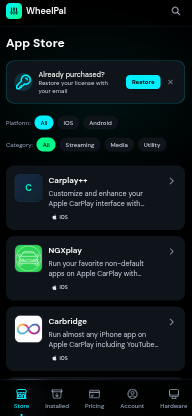
For users on modern iPhones that cannot be jailbroken, WheelPal guides you toward the no-jailbreak software and hardware options covered below. This is what makes it the right starting point regardless of your device.
CarTube - YouTube on CarPlay Without Jailbreak
CarTube is a dedicated YouTube player for Apple CarPlay that works on any device. It is not an official YouTube app but a purpose-built alternative that brings the full YouTube experience to your dashboard. Key features include browsing, searching, and watching YouTube videos directly on the CarPlay screen, no ads, the ability to skip sponsored segments, continuous video playing between CarPlay and your iPhone, a "Play on CarPlay" share extension, and instant paste of any copied YouTube URLs. One honest limitation: CarTube currently supports 360p video quality only, so do not expect HD playback on your car screen.
CarMovie - Local Video Player for CarPlay Without Jailbreak
CarMovie is a local video player for CarPlay. The content appears on your CarPlay screen in full screen with audio sent to your car's speakers. It supports playlist management, customizable playback settings, and URL-based video loading including MP4 links and M3U8 streams. CarMovie is free, available as an IPA from its GitHub page.
Nugget - System-Level iOS Customization Without Jailbreak
If you want to change how your iPhone itself looks and behaves, not just what runs on the CarPlay screen, Nugget is worth knowing about. It's a separate tool from WheelPal, CarTube, and CarMovie. Those three are built specifically for CarPlay, while Nugget handles system-level iOS tweaks like custom wallpapers, status bar changes, and lockscreen customization, all without a jailbreak.
Nugget isn't a CarPlay app and won't add anything to your dashboard. Start with WheelPal for CarPlay customization, then look at Nugget separately if you also want to customize your iPhone's home screen and lockscreen. Setup templates and compatibility details for the latest iOS release are in our Nugget iOS 26 guide, and the general install guide covering wallpapers and Nugget iOS templates is at Nugget iOS.
WheelPal - The Best Software Solution
Not ready for hardware? WheelPal is the best software solution for CarPlay in 2026.In software testing, WheelPal worked best as a compatibility checker and guided starting point, especially when the same iPhone behaved differently across iOS versions or CarPlay app options.
What it is:
- A guided CarPlay app store that works on iOS 9 through iOS 26
- Installs via a configuration profile - no complex sideloading
- Identifies your device and recommends the right apps for your iOS version
What is listed inside:
- CarTube - YouTube on CarPlay
- CarMovie - local video playback
- CarBridge - run any app on CarPlay (jailbreak required)
- NgxPlay - full screen mirroring (jailbreak required)
- CarPlay+++ - UI customization (jailbreak required)
Who it is for:
- Drivers who want to start with software before committing to hardware
- Any iPhone user regardless of iOS version or jailbreak status
Want to change how CarPlay looks, not just what apps it runs? See our full CarPlay customization guide covering wallpapers, layout, and grid tweaks.
What's the Best Hardware Option for CarPlay Streaming?
If you simply want a plug-and-play solution with zero technical steps, hardware is the cleanest answer.
Carlinkit AI Box - The Best All-Round Choice
What it is:
- Android 13 OS
- Qualcomm 8-core processor
- 4GB RAM, 64GB storage - expandable via TF card up to 512GB
- Optimized software that consistently outperforms rivals on identical hardware
What you get access to:
- Netflix, YouTube, Hulu, Disney+, Prime Video
- TikTok, Instagram, Facebook
- Google Maps, Waze, Spotify
- Any app from Google Play Store
- All running natively on the box - not mirrored from your phone
Setup:
- Plug into your car's USB port
- Pair once via Bluetooth
- Reconnects automatically every time you start the car
Compatibility:
- 98% of factory wired CarPlay and Android Auto cars
- Exceptions: BMW, certain Nissan and Changan models
- iPhone 6 through iPhone 16 Pro Max
- iOS 10 to iOS 26
Why we recommend it:
In our testing across different factory wired CarPlay systems, the Carlinkit AI Box delivered the most consistent startup, app launch, and wireless reconnection performance among the plug-and-play options.
- The most practical everyday choice
- Fastest boot and app launch speeds in its class
- Regular firmware updates and strong long-term support
- Covers every streaming and app scenario most drivers need
- Adds streaming apps to CarPlay
- Supports wireless CarPlay and Android Auto
- Works with Netflix, YouTube, and video streaming
- Hardware solution with Android 13.0
Ottocast P3 - The Best Choice for Complete Independence
What it is:
- Android 12 OS
- Qualcomm Snapdragon 665 processor
- 4GB RAM, 64GB storage
- Full Google Play Store access
- Wireless CarPlay and Android Auto simultaneously
What makes it different - three features no other box at this level offers:
During testing, the Ottocast P3 stood out most in setups where independent internet, GPS, split-screen use, or rear-seat HDMI output mattered more than the fastest possible boot time.
Built-in 4G LTE with SIM card slot:
- Insert your own SIM and the box has its own internet connection
- No reliance on your iPhone hotspot or phone signal
- Streams independently in poor coverage areas
- Keeps your phone's data free on long trips
- Works even when a passenger is already using your hotspot
Independent built-in GPS:
- Own GPS module with internal antenna
- Connects to your car's existing GPS antenna where available
- Navigation runs on the box without using your iPhone's location services
- Useful when your phone is charging or being used for something else
Split-screen and HDMI output:
- Run navigation and a streaming app on screen at the same time
- HDMI output mirrors to rear seat displays if your car supports it
Trade-offs to know:
- Android 12 rather than Android 13 - slightly older app compatibility in edge cases
- Half-second delay when switching between heavy apps simultaneously
- Higher price than the Carlinkit
- Upgrades factory wired CarPlay or Android Auto systems
- Adds wireless connectivity and app streaming
- Runs an Android-based interface
- Supports Netflix, YouTube, Hulu, Prime Video, Disney+, TikTok, and navigation apps
Carlinkit vs Ottocast P3 - Which One Is Right for You?
| Feature | Carlinkit AI Box | Ottocast P3 |
|---|---|---|
| Android Version | Android 13 | Android 12 |
| Processor | Qualcomm 8-core | Qualcomm Snapdragon 665 |
| RAM / Storage | 4GB / 64GB | 4GB / 64GB |
| Built-in 4G LTE | Via hotspot only | Yes - SIM card slot |
| Built-in GPS | Yes | Yes - independent antenna |
| Split Screen | No | Yes |
| HDMI Output | No | Yes |
| Google Play Store | Yes | Yes |
| Car Compatibility | 98% of factory wired CarPlay cars | Factory wired CarPlay cars |
| Best For | Most drivers | Drivers wanting phone independence |
Choose the Carlinkit if you want:
- Best everyday value
- Latest Android 13 OS
- Widest car compatibility
- Straightforward setup with no trade-offs
Choose the Ottocast P3 if you want:
- Your car setup fully independent of your phone
- Built-in 4G LTE without relying on a hotspot
- Independent GPS navigation
- Split-screen multitasking
- HDMI output for rear screens
Which CarPlay Tweak Is Right for You?
| Solution | Jailbreak Needed | Best For | iOS Support | Where to Get |
|---|---|---|---|---|
| WheelPal | No | Starting point / guided hub | iOS 9 to iOS 26 | wheelpal.carplayhacks.com |
| CarTube | No | YouTube on CarPlay | Select iOS 14 to 17 | Via WheelPal |
| CarMovie | No | Local video playback | iOS 15 to 17 | Via WheelPal |
| Carlinkit AI Box | No | Full streaming, any app | iOS 10 to iOS 26 | shop.carplayhacks.com |
| Wireless Adapter | No | Cable-free CarPlay | Any | shop.carplayhacks.com |
| CarBridge | Yes | Any app on CarPlay | iOS 13 to 16.5 | Via WheelPal |
| NgxPlay | Yes | Full screen mirroring | iOS 13 to 16 | Via WheelPal |
| CarPlay+++ | Yes | UI customization | iOS 13 to 14.5 | Via WheelPal |
Frequently Asked Questions Related to Best CarPlay Tweaks in 2026
In 2026, you do not need a jailbreak to get more out of CarPlay.
If you want to start with software, install WheelPal. It works on any iPhone from iOS 9 to iOS 26, identifies your device, and guides you to the right CarPlay apps for your setup CarTube for YouTube, CarMovie for local video, and jailbreak tweaks for older devices that support them.
If you want the most capable solution with no technical steps, go straight to hardware. The Carlinkit AI Box is the best all-round choice Android 13, full Google Play access, and compatibility with 98% of factory wired CarPlay cars. If you want your car setup to run independently of your phone with built-in 4G LTE and dedicated GPS, the Ottocast P3 is the better fit.
Disclaimer: Streaming apps on CarPlay should only be used when the vehicle is parked. Do not watch videos or interact with entertainment apps while driving, because roads are already chaotic enough without Netflix joining the disaster.